
An education level is the top of your curriculum — HSC, Job Preparation, Class 10. Create one before anything else, because groups, subjects, chapters and topics all hang beneath it.
Two Ways to Open the Form
Both create exactly the same thing — use whichever tab you are already on:
- From Tree View — click the green + Add Education Level button on the right.
- From the Education Levels tab — click the green + Add Level button.
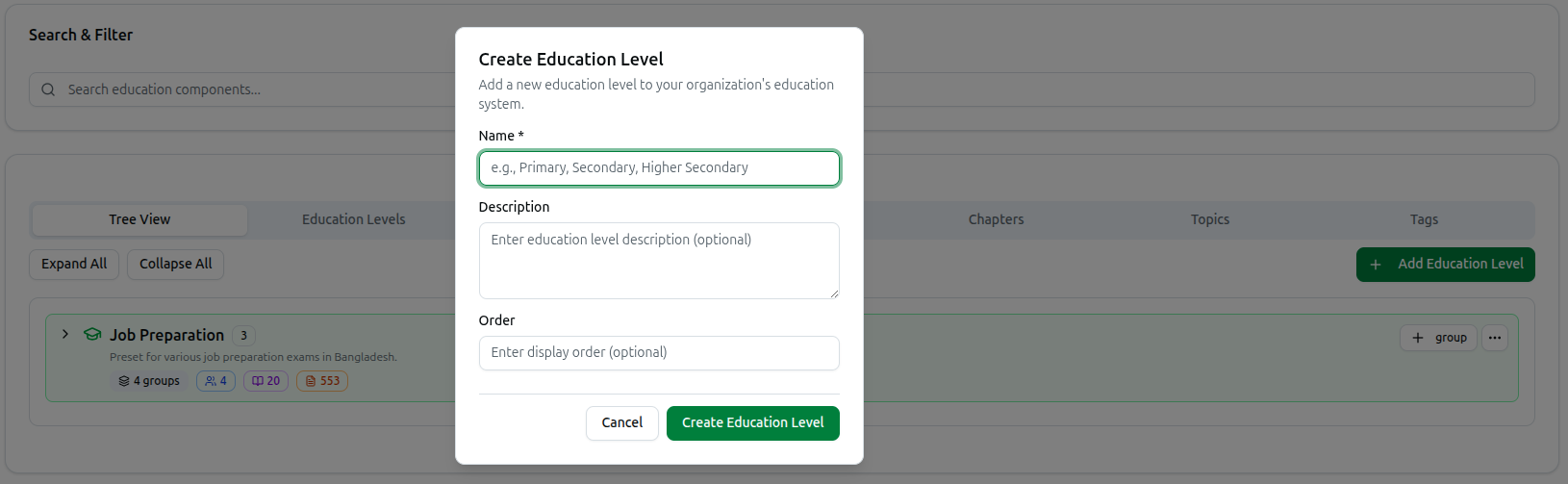
Either way you get the Create Education Level dialog: Add a new education level to your organization's education system.
Filling In the Form
Name (required)
The only field you must complete — e.g., Primary, Secondary, Higher Secondary, or Class 10, SSC, HSC.
Use the term your students actually use. This name appears in course filters, question tagging and your public website, so HSC beats Higher Secondary Certificate Programme in almost every case.
Description (optional)
A note for your own team — Enter education level description (optional). Students never see it. Useful when two levels could be confused.
Order (optional)
The number deciding where this level appears in lists. Lower numbers come first. Leave it blank and the level joins the end.
If you already know your levels, number them in teaching order as you go — Class 9 as 1, Class 10 as 2, HSC as 3 — so every dropdown across the platform reads naturally.
Click Create Education Level to save, or Cancel to discard. You will see Education level created successfully!
What to Do Next
A level on its own does nothing. Build downward:
- Add a group — the stream inside this level, such as Science or BCS. In Tree View, click + group on your new level's row.
- Add subjects, then chapters, then topics beneath those.
Do not create levels one at a time if you teach a standard curriculum. Click Import Curriculum at the top of the page and pick a preset instead — it creates the level together with its groups, subjects, chapters and topics in a single step. A preset like Job Preparation arrives with hundreds of chapters already in place.
Troubleshooting
| What you see | What it means |
|---|---|
| Please enter education level name | Name is empty — it is the one required field |
| Failed to create education level | The save did not go through. Check the name and try again |
| Your levels list in the wrong order | Set Order on each one; lower numbers appear first |
| The new level is empty in Tree View | Expected — add a group to it with the + group button on its row |
Related: Manage Education Levels · Managing the Curriculum · Hierarchy Philosophy