
Curriculum Hierarchy Philosophy
Course37 uses a structured 5-level hierarchy to organize educational content across your organization. This exact 5-step breakdown (Level → Group → Subject → Chapter → Topic) is the backbone of the platform — it powers question banks, exams, and website filtering.
You build and manage it from Curriculum in the left sidebar, under Content. The page is headed Education Curriculum — Manage your organization's educational structure.
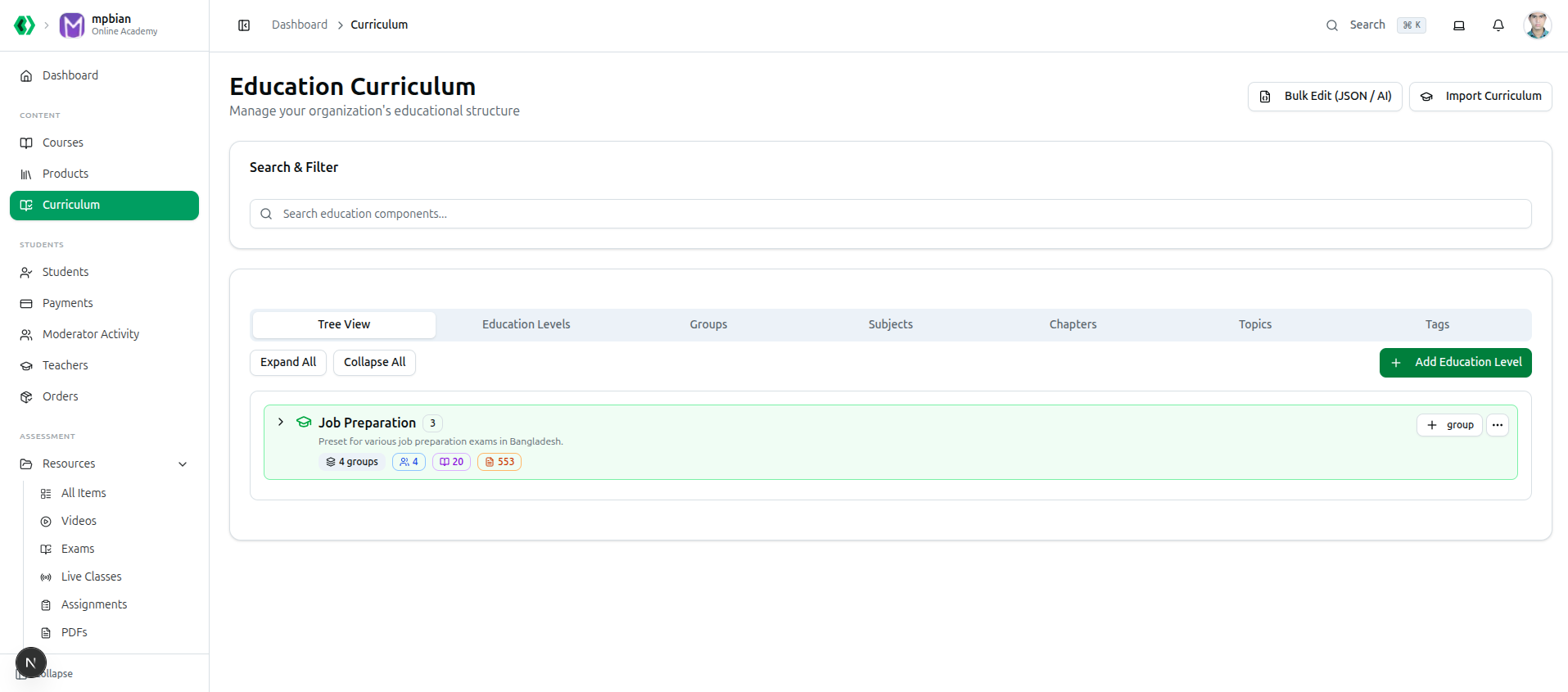
The Tree View shows your whole structure at a glance. Each education level displays how much sits beneath it — in the example above, Job Preparation holds 4 groups, 4 subjects, 20 chapters and 553 topics.
Build this before you build anything else. Questions are tagged to Subject → Chapter → Topic, exams pull from those tags, and your public course listings filter on Level and Group. Adding the hierarchy after you have created content means re-tagging all of it by hand.
Practical guide: Managing the Curriculum
The Hierarchy Structure
The hierarchy starts directly at the Education Level. From there, you build downwards:
1. Level (e.g., HSC, Job Preparation)
     └── 2. Group (e.g., Science, BCS)
          └── 3. Subject (e.g., Physics, English Literature)
               └── 4. Chapter (e.g., Kinematics, Chapter 4)
                    └── 5. Topic (e.g., Projectile Motion, Shakespeare)
Why This Hierarchy Matters
The curriculum hierarchy is not just internal organization — it directly powers what your students see:
| Feature | Interacts With Hierarchy By: |
|---|---|
| Website Builder (Course Grids) | The "Course Listing" section on your website automatically filters and displays courses based on the Level and Group you assign here. |
| Question Bank | Questions are tagged to Subject → Chapter → Topic, enabling precise filtering and nested search. |
| Exam Generation | Generate automatic OMR/Online sets by telling the system: "Pull 5 questions from Kinematics, 3 from Optics." |
| Analytics | Performance reports can be analyzed by chapter and topic. |
| Performance Insights | The student performance report can highlight weak areas by Topic (e.g., "Student is weak in Projectile Motion"). |
Real-World Examples
Here is how you can adapt the 5-level structure for different types of educational goals:
Example A: Academic Coaching (HSC)
HSC (Level)
├── Science (Group)
│   ├── Physics (Subject)
│   │   ├── Ch 2: Motion (Chapter)
│   │   │   ├── Distance & Displacement (Topic)
│   │   │   └── Acceleration (Topic)
Example B: Job Preparation / Competitive Exams
Job Preparation (Level)
├── BCS (Group)
│   ├── English Literature (Subject)
│   │   ├── Chapter 4: Elizabethan Period (Chapter)
│   │   │   ├── Shakespeare (Topic)
│   │   │   └── Christopher Marlowe (Topic)
Best Practices
- Plan before typing: Map out your full hierarchy on paper before entering it.
- Keep naming consistent: Consistent naming makes searching and reporting easier.
- Use concise labels: Shorter level/group names make filtering easier on the website and dashboard.
Related Articles
- How to Create Tags — Additional categorization beyond the hierarchy
- How to Manage Question Banks — Questions mapping to this tree
- How to Edit Webpage Sections — How the Website Builder uses curriculum levels