
YouTube Live needs no setup at all. Google Meet needs a Google Cloud OAuth app connected first. This guide covers both.
YouTube Live
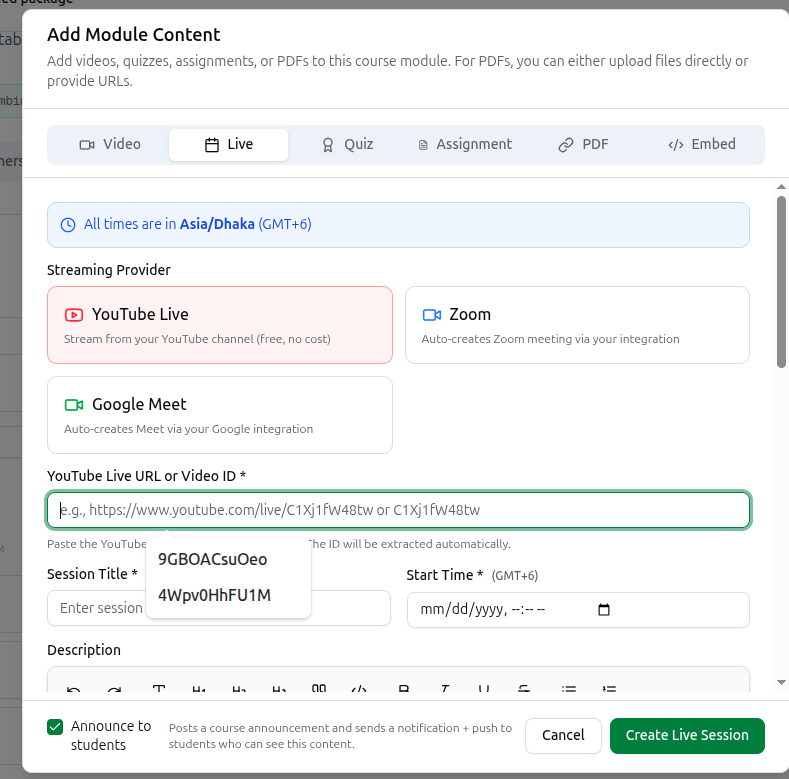
Choose YouTube Live — Stream from your YouTube channel (free, no cost) — when scheduling a live class from a course's Modules tab.
Paste your YouTube Live URL or Video ID — e.g., https://www.youtube.com/live/C1Xj1fW48tw or C1Xj1fW48tw. Either the full URL or the bare ID works; Course37 extracts the ID automatically and shows a Preview to confirm it found the right stream.
This is the only provider that requires no integration setup. There is nothing to connect under Integrations — if you already stream to YouTube, you can schedule a class with this provider in one step.
Google Meet
Connect this from Integrations in the left sidebar under Platform, then click Google Meet — Connect Google Meet for live sessions.
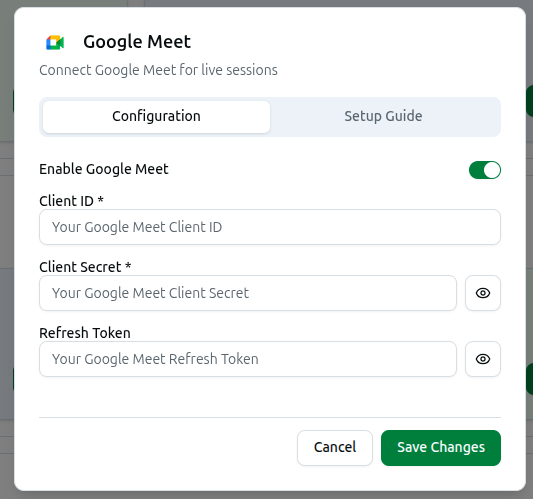
Toggle Enable Google Meet, then three fields:
| Field | Required? | What it is |
|---|---|---|
| Client ID | Yes | From a Google Cloud OAuth 2.0 app |
| Client Secret | Yes | From the same OAuth app |
| Refresh Token | Not marked required in the form | Generated by completing the OAuth flow once |
Generate the Refresh Token even though the form does not force you to. The setup guide's own final step is "Generate Refresh Token — Complete OAuth flow to get refresh token," which exists precisely because Course37 needs to create Calendar events on your behalf without asking you to re-authorize every time. Skipping it is the most likely reason meeting creation fails silently after the other two fields are saved.
Where these come from: a Google Cloud project with the Calendar API enabled, an OAuth consent screen, and OAuth 2.0 credentials created as a Web application — the full path is in the Setup Guide tab of this dialog.
Google Meet Always Opens Externally
This is the one thing worth knowing before you connect it: Google Meet meetings cannot be embedded in your platform. When scheduling a session, Course37 states this directly:
A Google Meet meeting will be automatically created via Google Calendar API using your organization's Google Meet integration credentials. Students will join via an external link (Google Meet does not support embedding).
Compare this with Zoom, which can embed if you configure its separate Meeting SDK credentials. There is no equivalent path for Google Meet — no amount of extra configuration changes this. If keeping students inside your platform matters to you, Zoom with its Meeting SDK is the provider that supports it; Google Meet is not.
Troubleshooting
| What you see | What it means |
|---|---|
| YouTube preview shows the wrong video | Re-check the pasted URL or ID |
| Google Meet sessions save but no meeting is created | Client ID or Client Secret are wrong, or the Refresh Token was never generated |
| Students always get an external Google Meet link | Expected — Google Meet cannot embed, regardless of configuration |
| Google Meet does not appear as a provider | Enable Google Meet is off, or required fields were never saved |
Related: Live Class Resources · Zoom Integration · Global Live Class Settings