
How to Monitor Resource Usage
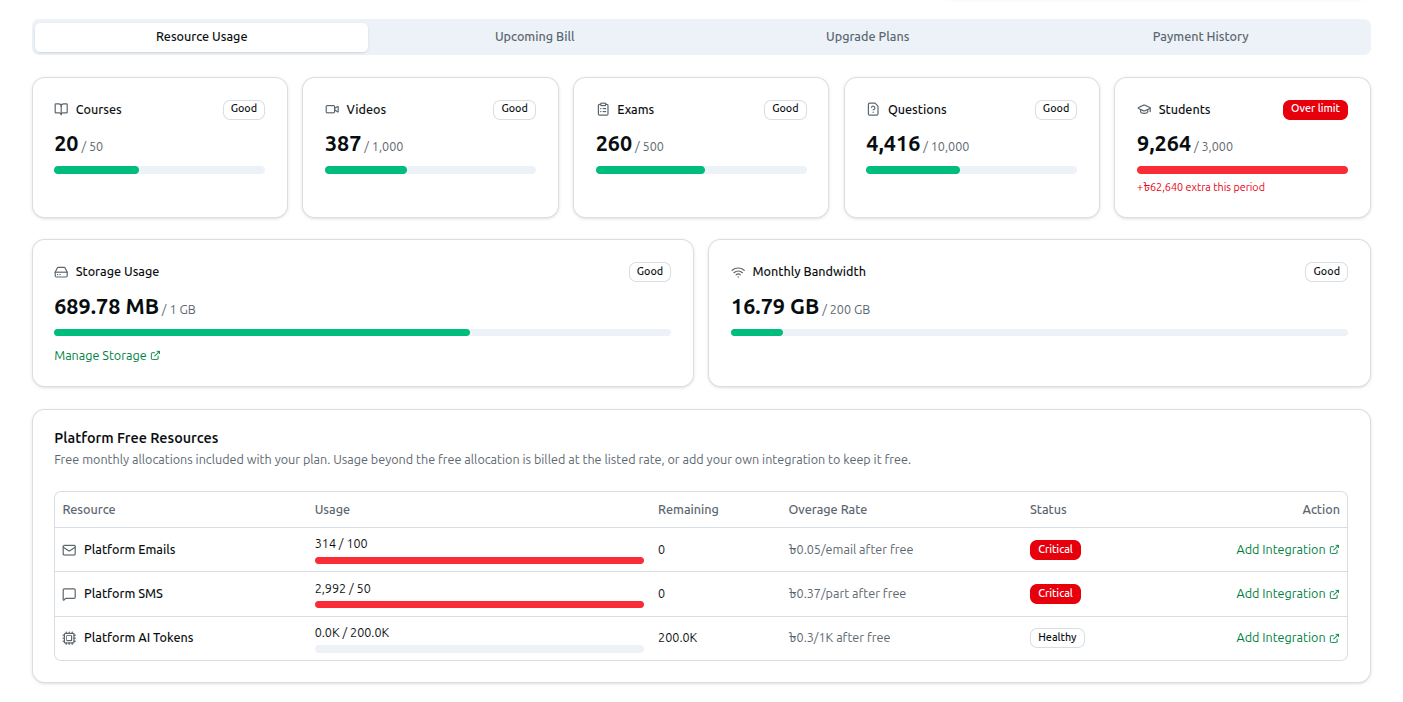
The Resource Usage tab on the Uses & Plans page (/dashboard/uses-and-plans) gives you a real-time overview of how much of your current plan's allocation you have consumed.
- Detailed Usage Bars: Five cards track Courses, Videos, Exams, Questions, and Students, each showing
{used} / {limit}and a status badge — Good, Warning (75%+ used), Critical (90%+ used), Over limit, or Unlimited if your plan has no cap on that resource. - Storage & Bandwidth: Two more cards track file Storage Usage (with a Manage Storage shortcut) and Monthly Bandwidth, using the same badge/limit format.
- Platform Free Resources: A table lists free monthly allocations included with your plan — Platform Emails, Platform SMS, and Platform AI Tokens — with columns for Usage, Remaining, Overage Rate, and Status, plus an Add Integration action to connect your own provider and avoid overage charges.
Your plan and estimated bill live in the Current Plan and Upcoming Bill cards above the tabs — any usage beyond your limits here shows up as Extra usage on that bill.
Related: Managing Usage, Plans & Settings — Full walkthrough including the Upcoming Bill breakdown